
Are you confident in your ability to spot a fake email? Phishing attacks are one of the most common and most effective ways cybercriminals steal your personal data, bank account credentials, and even your company’s secrets. They don’t rely on complex code; they rely on trickery. If you’re looking for a simple, comprehensive guide on how to protect yourself, you’ve come to the right place.
This beginner’s guide will demystify phishing attacks for beginners, showing you exactly what they are, the different forms they take, and the simple, actionable steps you can take today to stay safe online.
🎣 What Exactly is a Phishing Attack?
A phishing attack is a type of social engineering where an attacker attempts to trick you into revealing sensitive information, usually by disguising themselves as a trustworthy entity. They often pose as a bank, a popular social media platform, a streaming service, or even your workplace’s IT department.
The goal is always to harvest data, which can include:
- Login credentials (usernames and passwords).
- Credit card and bank account numbers.
- Social Security or other government ID numbers.
The core mechanism of phishing is deception. The attacker uses a false sense of urgency or fear to make you click a malicious link or open an infected attachment.
🔍 Anatomy of a Phishing Email: 5 Red Flags to Spot
Understanding the common traits of a fraudulent message is your best defense. Train your eye to look for these five tell-tale signs in any suspicious communication:
1. The Urgency or Threat
Phishing attempts almost always try to pressure you into immediate action. They might claim:
- “Your account will be suspended in 24 hours!”
- “Your recent payment failed—click here to update immediately.”
- “You have won a lottery prize—claim it now!”
2. Suspicious Sender Address
Always check the “From” address, not just the name. The domain should match the legitimate company. For example, if you get an email from “PayPal,” the sender’s actual address should end with @paypal.com, not @paypa1.co or @gmaii.com. Look closely for misspellings or strange characters.
3. Generic Greetings
If an email from your bank starts with “Dear Customer” instead of your name, be cautious. Legitimate companies typically use the full name associated with your account.
4. Malicious Hyperlinks
The most critical step: Hover your mouse cursor over any link (without clicking!) to see the true destination URL displayed in the bottom corner of your browser or email client. If the visible link says apple.com but the hover text shows a random, long, or strange URL, it’s a trap.
5. Poor Grammar and Spelling
While not always the case, many phishing attacks for beginners guides point out that messages from foreign actors often contain poor grammar, awkward phrasing, or unusual capitalization. Legitimate organizations have professional communications teams.
🌐 The Different Types of Phishing Attacks
Phishing isn’t limited to just email. Attackers constantly evolve their methods.
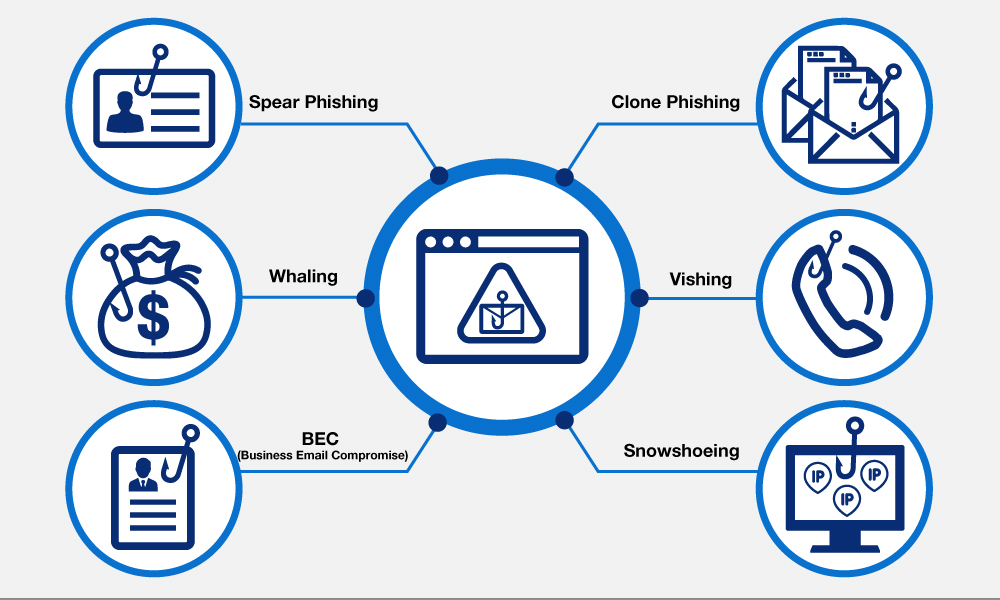
- Email Phishing (Standard Phishing): The most common type, sent out to millions of addresses indiscriminately.
- Spear Phishing: A highly targeted attack customized for a specific individual or organization. The attacker often knows your name, job title, and other personal details to make the message look authentic.
- Whaling: Spear phishing directed specifically at high-profile targets like CEOs, CFOs, or senior executives.
- Vishing (Voice Phishing): Using a phone call where the attacker pretends to be a legitimate person (e.g., a tax official or bank representative) to trick you into giving information over the phone.
- Smishing (SMS Phishing): Using text messages to send malicious links, often related to package delivery updates or bank alerts.
✅ 5 Essential Steps to Avoid Becoming a Victim
Implementing these simple cybersecurity practices is the most effective way to protect yourself and your data from phishing scams.
1. Never Click Unsolicited Links or Attachments
If you receive an unexpected email with a link to “verify your account,” do not click it. Instead, open a new browser window and type the company’s official website address directly (e.g., www.amazon.com) and log in normally to check your account.
2. Use Multi-Factor Authentication (MFA)
MFA (also called Two-Factor Authentication or 2FA) is your digital failsafe. Even if a criminal steals your password, they can’t access your account without the secondary code sent to your phone or generated by an app. Enable MFA on every single account you have.
3. Keep Your Software Updated
Regularly update your operating system, web browser, and security software. Updates often contain patches that fix security vulnerabilities exploited by phishing kits and malware.
4. Install Antivirus/Anti-Malware Software
A reliable security suite can block access to known malicious websites and scan email attachments for viruses before they can harm your device.
5. Be Suspicious of Any Request for Credentials
Legitimate companies will never ask you to send your password, credit card number, or other sensitive information via email or text message. If in doubt, call the company directly using the official phone number listed on their website.
Conclusion: Your Role in Cybersecurity
Phishing attacks remain a huge threat, but as a reader of ViralGlobalsNews, you now have the knowledge to be your own best defense. Remember that curiosity and immediate action are the attacker’s best friends. Take a deep breath, look for the red flags, and always verify the source independently. By following these steps, you minimize the risk and keep your digital life secure.
 Nandni Sachdeva